


Key Takeaways
- Lead classification only matters if it changes your next action: which filters you set, which channel you use, and how you follow up.
- For outbound teams, list accuracy and recency are more critical than a lead’s temperature (cold, warm, hot).
- Business-to-business (B2B) and business-to-consumer (B2C) leads are fundamentally different record types. B2B lists are built with firmographics like Standard Industrial Classification (SIC) code and executive title; B2C lists use demographics like homeowner status and age.
- Qualification stages like Marketing Qualified Lead (MQL) and Sales Qualified Lead (SQL) are only useful when marketing and sales agree on the specific data-field thresholds that trigger the handoff.
- Choose your outreach channel (calling, direct mail, email) before building your list, since each channel requires its own data fields and compliance checks. You are responsible for following all applicable local, state, and federal laws, and InfoFree is not liable for how you use the data.
Before judging whether a list is good or bad, a sales team needs to know what type of lead it is working with and whether the list was built with filters that matched that type.
Classifying the different types of sales leads is not a vocabulary exercise. It only matters if the classification changes what you do next. When a sales team applies the same outbound cadence to every lead regardless of type, the cost is not just lower conversion; it is wasted capacity, because reps spend equal time on leads that needed a phone call today and leads that needed a nurture email next month.
This guide explains the three frameworks for classifying sales leads by temperature, qualification, and source. It also covers how each classification should change your workflow and how B2B and B2C leads differ at the data-field level.
What Is a Sales Lead?
A sales lead is a person or organization that matches enough of your targeting criteria to warrant outreach but has not yet been qualified through direct conversation. The term is often used interchangeably with “prospect,” but for operational purposes, a lead is a record that has been selected but not yet contacted.
A lead is defined by its data attributes, and those attributes differ depending on whether you are selling to a business or a consumer.
- A B2B lead is typically a company record with firmographic attributes like Standard Industrial Classification (SIC) code, employee count, annual sales volume, and an associated executive with a specific title.
- A B2C lead is an individual or household record with demographic attributes like homeowner status, estimated home value, age band, household income, or a recent move date.
A lead can come from a purchased or compiled list, an inbound form fill, a referral, or a trigger event like a new-business filing. The source determines what you know about the lead and how you should approach the first contact.
Lead Types by Temperature: Cold, Warm, and Hot
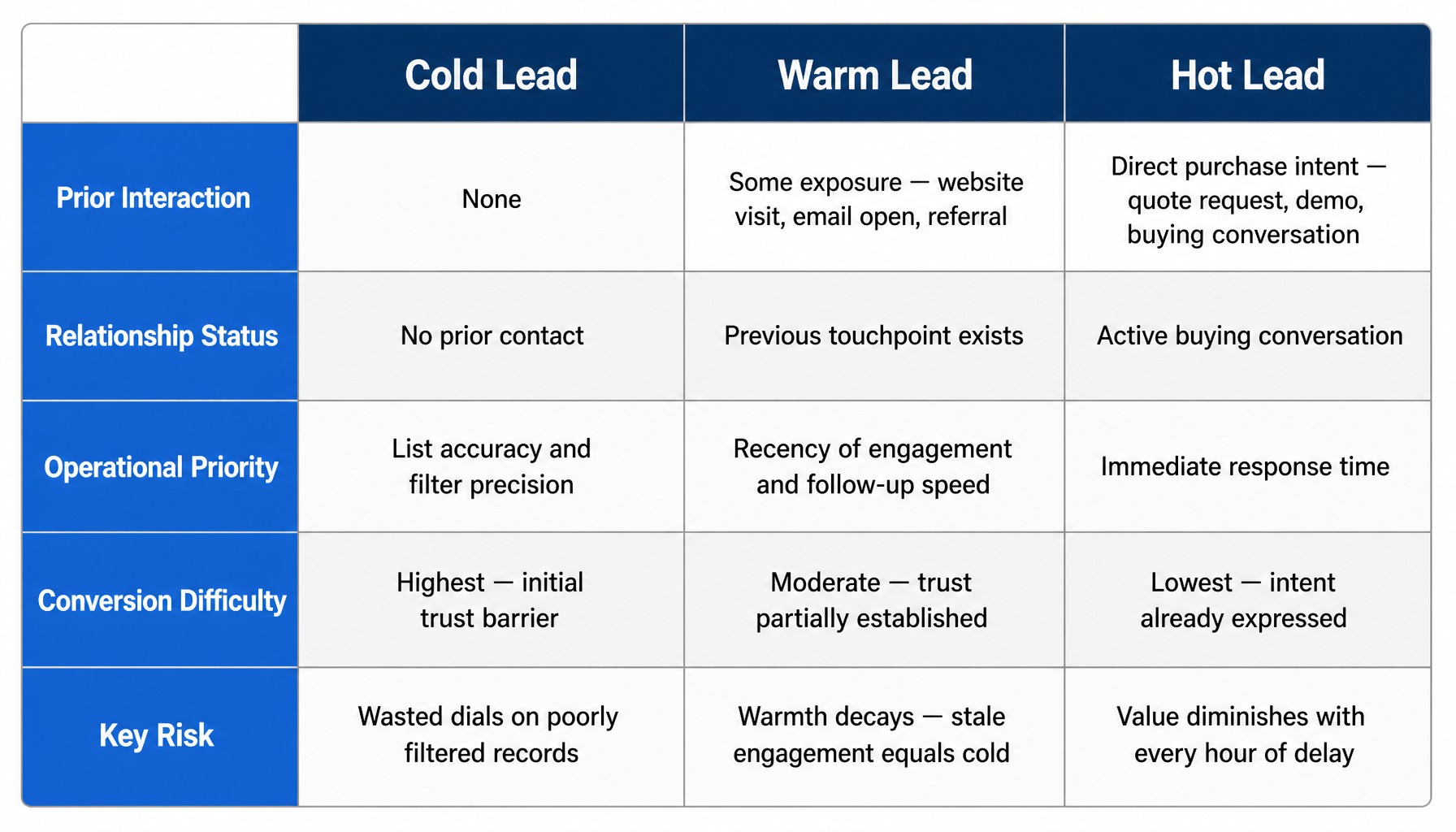
Temperature-based classification is the framework salespeople encounter first. It is useful for setting expectations about conversion difficulty, but it is not the framework that should drive outbound list-building. A record tagged “warm” because someone opened an email six months ago reflects stale engagement, and for the rep dialing it, that tag says little about whether the call will connect.
The operational variable for outbound teams is whether the underlying record is accurate, current, and filtered to the right segment. A warm tag does not make up for a stale record, and a cold tag does not discount a fresh, well-filtered one. For instance, an insurance agent working a list of seniors turning 65 (a T65 list) is technically making cold calls. But because the list is highly targeted by a specific demographic filter, the agent’s results depend more on whether the phone numbers are current than on whether the person has heard of the agency before.
Cold Leads
A cold lead is a record of a person or company that has had no prior interaction with you or your business. Cold leads are the default output of compiled-list prospecting. When you pull a list filtered by SIC code, geography, and employee count, every record on that list is cold. “Cold” is not a quality judgment; it describes the relationship status, not the record’s potential value.
Any cold outreach, whether through calling, direct mail, or email, is subject to regulations like the Do Not Call (DNC) Registry, the Telephone Consumer Protection Act (TCPA), and the Controlling the Assault of Non-Solicited Pornography And Marketing Act (CAN-SPAM). As the sender or caller, your organization is responsible for ensuring compliance with all applicable local, state, and federal laws, and InfoFree is not liable for how you use the data.
Warm Leads
A warm lead is a record of a person who has had some prior exposure to your business they may have visited your website, opened a marketing email, attended a webinar, or been referred by an existing customer. Warm leads typically have higher conversion potential than cold leads because the initial trust barrier is lower.
However, warmth decays quickly: it is a function of recency and interaction depth, not a permanent status that lives in a customer relationship management (CRM) field forever.
Hot Leads
A hot lead is a record of a person who has expressed direct purchase intent. They have requested a quote, asked for a demo, or initiated a buying conversation. With hot leads, the operational priority is response time, not additional qualification. The value of a hot lead diminishes with every hour of delay. In outbound-heavy organizations, hot leads are rare relative to the volume of cold and warm leads, so each one that arrives warrants an immediate, assigned response.
Lead Types by Qualification Stage: IQL, MQL, and SQL
Qualification-based classification describes where a lead sits in the handoff between marketing and sales. The labels Information Qualified Lead (IQL), Marketing Qualified Lead (MQL), and Sales Qualified Lead (SQL) only work when your team has agreed on what triggers each transition, and that agreement should be written into the internal scoring rules behind each label.
Friction starts when the MQL definition is based on engagement (downloaded a whitepaper) rather than fit (matches the target SIC codes and employee count), because sales then receives leads labeled “MQL” that do not match the target profile.
Information Qualified Leads (IQLs)
An Information Qualified Lead (IQL) is a person who has exchanged contact information for educational content a guide, a webinar registration, a newsletter signup but has not demonstrated purchase intent. IQLs are the earliest qualification stage, representing the largest volume with the lowest immediate conversion probability. They require nurturing with additional content and follow-up emails to guide them toward a sales conversation.
Marketing Qualified Leads (MQLs)
A Marketing Qualified Lead (MQL) is a lead that has met a predefined set of criteria agreed upon by marketing and sales. These criteria are typically a combination of engagement behavior (visited a pricing page) and fit attributes (correct industry, company size, or role). The MQL definition should be written down, not assumed.
For outbound-heavy teams, MQL criteria often lean more on fit than engagement. The lead may not have interacted with marketing content at all, having instead been identified through list building and filtered by specific firmographic or demographic attributes. In this context, an MQL is a record that matches your ideal customer profile, even if it is still a cold lead by temperature.
Sales Qualified Leads (SQLs)
A Sales Qualified Lead (SQL) is a lead that a salesperson has accepted as ready for direct sales engagement, typically after a discovery call or a confirmed needs assessment. This is the stage where the lead becomes a pipeline opportunity. The transition from MQL to SQL is the critical handoff point where marketing and sales alignment either works or breaks down.
In smaller teams and owner-led businesses, the MQL-to-SQL distinction may collapse into a single workflow. The same person builds the list, makes the call, and qualifies the lead. Whether the team is large or small, an SQL without a scheduled next step quickly reverts to a warm or even cold lead.
Lead Types by Source: Inbound vs. Outbound
The source of a lead determines what data you have, how you should message, and how quickly you need to act. An inbound form submission provides self-reported fields, while an outbound list provides compiled fields, and the two rarely overlap cleanly without manual mapping.
For a home-service business such as a roofing contractor, inbound leads arrive through a website form where a homeowner submits an address and describes a problem, while outbound leads come from a list of new homeowners filtered by move date. The inbound lead gets a same-day callback; the outbound list gets a direct-mail piece followed by a phone call, and it can run as a Saturation Marketing campaign that reaches every new homeowner in a defined service area. The source dictates the workflow.
Read more: Homeowner Lead Lists – Email and Mailing Lists from Infofree
Inbound Leads
Inbound leads are records generated when a person initiates contact by filling out a form, calling a phone number, or responding to an ad. They arrive with self-reported data and an implied expectation of a response. The operational priority is speed. Even though the person initiated contact, inbound leads may still require qualification to confirm budget, authority, or fit with your offerings.
Outbound Leads
Outbound leads are records identified through proactive list building filtering a database by attributes like geography, industry, executive title, or homeowner status. These leads have no prior relationship with you, so the first touch must establish relevance immediately. The quality of an outbound list depends on the accuracy of the underlying database, the precision of the filters, and the suppression of records that should not be contacted (existing customers, DNC-registered numbers). Any outbound calling, emailing, or mailing program is your responsibility to operate in compliance with DNC, TCPA, CAN-SPAM, and all applicable local, state, and federal laws; InfoFree is not liable for how you use the data.
How B2B and B2C Sales Leads Differ at the Data Level
B2B and B2C leads are not just different audiences; they are different record types built from different data sources and filtered by different fields. Business records draw from registration filings and primary verification calls, while consumer records draw from deed transfers and public records.
- A B2B lead is a company or executive record filtered by firmographics like SIC or North American Industry Classification System (NAICS) code, employee count, annual sales, or executive title.
- A B2C lead is a consumer or household record filtered by demographics like homeowner status, estimated home value, household income, age, or move date.
On the B2B side, the industry code carries much of the targeting work in specialized verticals. Medical offices fall under SIC code 8011 (NAICS 621111). Outreach is aimed at the practice manager and has to respect the practice’s obligations under the Health Insurance Portability and Accountability Act (HIPAA), and contracts tend to run as service agreements. Coworking spaces are commonly classified under SIC code 6512 (NAICS 531120, lessors of nonresidential buildings).
HVAC contractors fall under SIC code 1711 and NAICS 238220. Outreach typically goes to the owner or general manager, and contracts usually run as residential service agreements or commercial maintenance contracts. That makes HVAC a far more practical example of how industry code, decision-maker targeting, and contract structure shape B2B list building for InfoFree customers.
An insurance agency that sells both group health plans and Medicare supplements works both record types. To prospect small businesses for group health plans, the agency filters its B2B database by SIC code, employee count (e.g., 10 to 50), and geography. To find individuals for Medicare supplements, the same agency filters its B2C database by age band and geography to build a T65 list. The data sources, filters, and outreach messages are entirely different. Blurring them creates targeting errors that waste budget.
Matching Lead Types to Outbound Channels
Channel selection should precede list building, not follow it, because the channel determines which data fields the record needs to contain. The lead type you target determines not just who you contact but how you contact them.
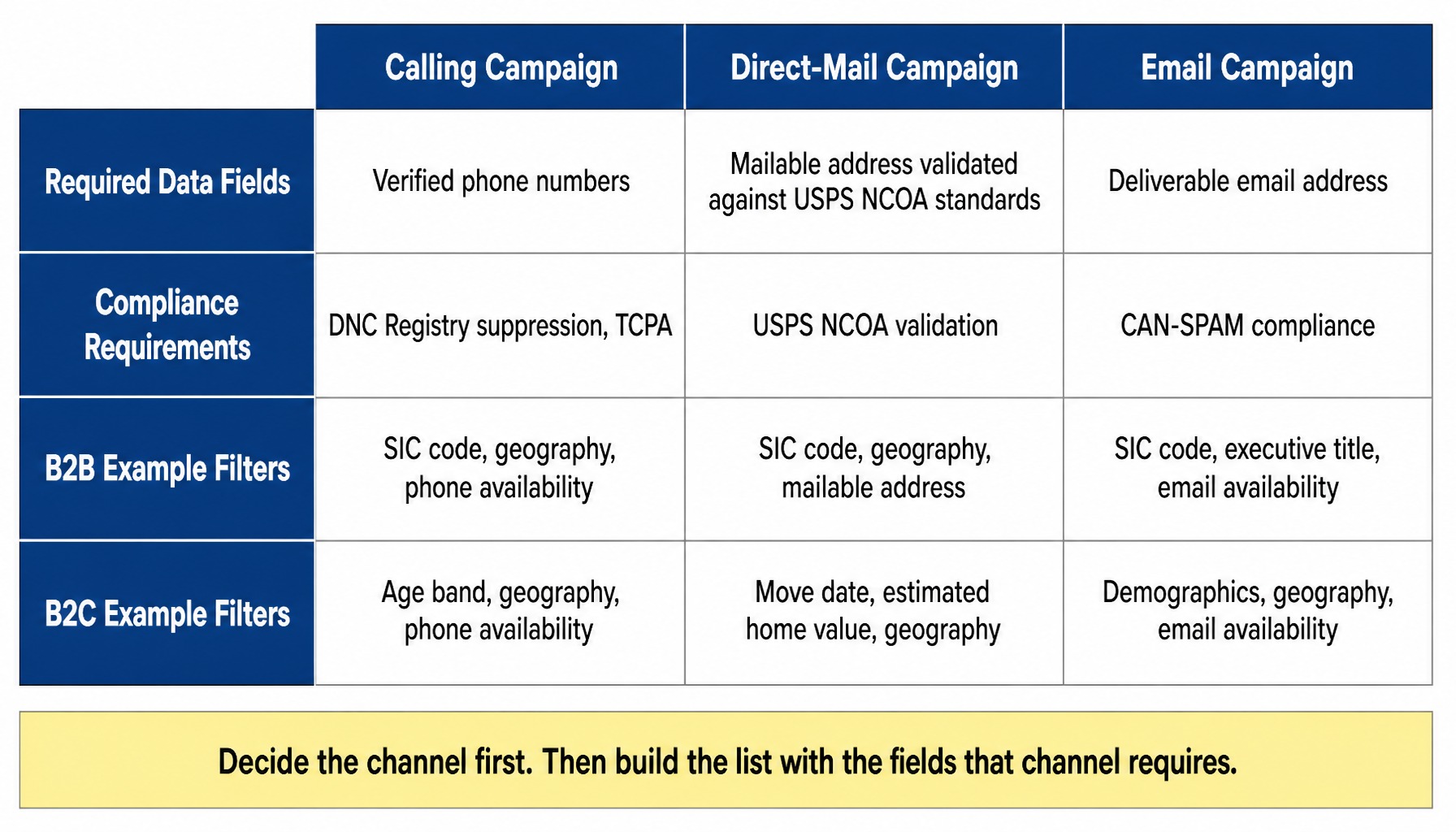
- A calling campaign requires verified phone numbers and a process for DNC suppression. A B2B list for calling would be filtered by SIC code, geography, and phone availability.
- A direct-mail campaign requires a mailable address validated against United States Postal Service (USPS) National Change of Address (NCOA) standards. A B2C list for mailing to new homeowners would be filtered by move date, estimated home value, and geography.
- An email campaign requires a deliverable email address and CAN-SPAM compliance. A B2B list for emailing accounting partners would be filtered by SIC code, executive title, and email availability.
Once the channel is set, build the list with the specific fields that channel requires, and run that channel’s compliance checks before the first touch. You are responsible for following all applicable local, state, and federal laws for each channel, and InfoFree is not liable for how you use the data.
Read more: Marketing Lists – Email and Mailing List Services from Infofree
Building Lead Lists Across B2B and B2C From One Platform
Lead classification only works when the underlying data supports the filters that define each type. InfoFree is a single self-service platform where you can search, filter, and build lists from both business and consumer databases, applying the same workflow to both.
The business database covers approximately 22 million businesses and their associated executives, and it is compiled from multiple sources and held to a stated accuracy standard. A separate database of approximately 270 million consumers supports B2C targeting; consumer and household records are compiled from a separate set of sources and are not rated on the same accuracy standard as business data. You can search and view records without per-record costs, with export limits that vary by plan.
Once you know which lead type you need and which filters define it, you can build your list and manage follow-up using the included CRM101 prospect management tool.
Search business and consumer databases see how the filters work for your lead type.
When using any exported data, customers are responsible for following all applicable local, state, and federal laws, including DNC, TCPA, CAN-SPAM, and state privacy statutes. InfoFree provides the data; it is not liable for how customers use it.
Conclusion
Lead-type classification is not a vocabulary exercise. It is an operational decision that determines which database you search, which filters you set, which channel you use, and how you follow up. The teams that convert leads consistently are not the ones with the longest taxonomy of lead types; they are the ones who match the lead type to the right filters, the right data, and the right follow-up cadence before the first dial is made or the first mailer is sent.
Frequently Asked Questions
How do you use SIC or NAICS codes to build a targeted B2B lead list?
SIC and NAICS codes classify businesses by industry. To build a targeted list, start with the 4-digit SIC code (or 6-digit NAICS code) for your target industry, then layer on geography, employee count, and annual sales volume as secondary filters. The narrower the industry code, the more relevant the list but the smaller the count.
What is a T65 list and which sales teams use it?
A T65 list identifies consumers who are turning 65 within a defined timeframe, typically the next 6 to 12 months. Insurance agents and senior-benefit programs use T65 lists, filtered by geography and age, to reach individuals approaching Medicare eligibility. These lists are built from consumer demographic data, not business records.
How should sales teams handle DNC compliance when working outbound lead lists?
Before dialing, scrub your list against the National Do Not Call Registry and any applicable state-level DNC lists. Maintain an internal suppression list of people who have asked not to be called. The customer not the data provider is responsible for compliance with all applicable local, state, and federal laws, and InfoFree is not liable for how you use the data. Document your suppression process and update it before each campaign.
How do you reduce duplicate contacts when working multiple lead lists?
Deduplication starts at the export stage. Match records by a unique identifier like a phone number or email address, not just by name. If you are working with lists from multiple sources, import them into a single CRM or spreadsheet and run a de-dupe check before assigning records to reps.
What data freshness standards should sales teams expect from a sales lead provider?
Business data providers often update records on a monthly or quarterly cycle using primary verification and public filings. Consumer records may update on a different schedule based on the source, such as NCOA processing or deed transfers. Ask your provider how often records are verified and which sources feed the updates.